
The short version
We just added a hands-on explorer to TopicStream, and it makes one of the most useful checks in this kind of work a whole lot easier. You point it at the posts you collected, drag a time window back and forth, and it shows you which accounts posted the same thing inside that window. Tighten the window and it tells you who fell off the list. Loosen it and it tells you who showed up.
Then I ran it on three real hours of Indonesian X, the same 3,045 posts from the last write-up. On the 134 posts that people actually sat down and wrote, it found nothing. Not one sentence and not one link shared by even two accounts.
Then I ticked a single box to include reposts, and it lit up with 1,266 accounts posting the exact same words inside about an hour.
That second result is the one I want you to remember, because it isn’t a network. It’s a thousand-some people hitting the repost button. Identical text is where you start looking. It is not what you found.
What’s new
TopicStream has always looked for accounts that post the same text or the same link within minutes of each other. It does that automatically every time it writes a report, using a window and a minimum number of accounts that you set in the config.
What we added in version 0.3.6 is a way to do that same check with your hands on the controls. Three pieces:
- An export. One command writes everything TopicStream collected to a plain CSV. It reads your own local database, so it costs nothing and sends nothing anywhere.
- The explorer. A single page that opens in your browser, loads that CSV (or any CSV of posts you already have), and gives you two sliders: how many minutes, and how many accounts.
- A button. If you use TopicStream’s browser workspace, every investigation now has an Explore bursts button that does both steps in one click.
The export and the explorer run entirely on your machine. Nothing gets uploaded, and it works with the network cable pulled out.
How it works
The easiest way to see it is on a sample, so we put a made-up one in the repo. Every account and every post in it is invented: a little campaign about a ferry, tucked inside ordinary small-town chatter. 96 posts from 24 accounts.
Load it and leave the sliders where they start, ten minutes and five accounts. The explorer finds 3 bursts and 12 accounts.
Now the part I like. Press Pin this list, then drag the window down to five minutes. The page tells you, by name, that two accounts just left. Those two are regular folks who saw the first post and pasted it seven and eight minutes later. Drag the window up to thirty minutes and one account joins: a slowpoke that posts the same thing about twenty minutes behind everyone else, every single time.
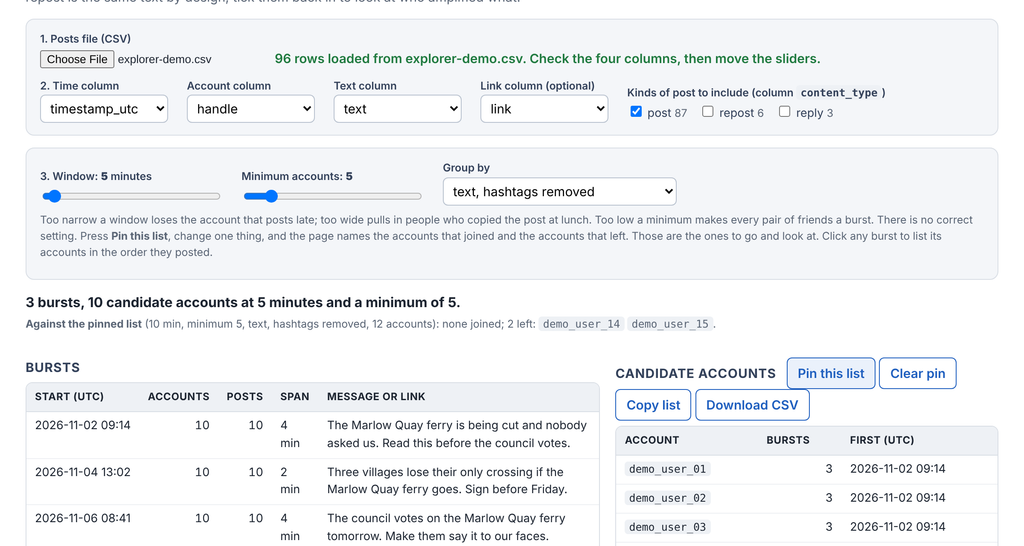
The made-up sample at five minutes, compared with the list I pinned at ten. Two accounts left, and it tells you which two.
That’s the whole idea. There is no correct window. What you care about is who moves when you change it, because the accounts at the edge are the ones worth opening up and looking at. This used to mean copying two lists into a spreadsheet and comparing them by eye. Now it’s one click.
A couple more things it does:
- Group by link instead of text, and it catches the account that spells the place name differently but shares the identical link.
- Type a piece of a link, like a tracking tag, and it lists every account that ever shared a link containing it, with no time window at all. On the sample that turns up 16 accounts, including one that always posts more than an hour late and would never land in any reasonable window.
- Click any burst and it lists the accounts in the order they posted.
On real data
A made-up sample is one thing. So I pointed it at the real collection from the last post: three busy hours of Indonesian X about Komdigi, the country’s communications ministry. 3,045 posts from 2,858 accounts. Getting it into the explorer took one command and cost nothing, because the posts were already sitting in the database from the original run.
The explorer sorts what it loads by kind. Here that was 13 original posts, 16 quote posts, 105 replies and 2,911 reposts. It starts with reposts and replies switched off, and I switched replies back on to be thorough.
On those, it found nothing, at any setting. I checked the long way too. Across all 134 posts that weren’t reposts, there isn’t a single sentence or a single link that two different accounts shared.
I’m happy with that, and here’s why. A tool that always finds something is a tool you can’t trust. This topic was loud and fast, exactly the kind of thing that looks coordinated from a distance, and when you check the actual words it’s 134 posts, each in its own words. That’s a real answer, and it took about a minute to get.
Reposts are a different question
Then I ticked the reposts box, and the page filled right up. With a sixty-minute window it shows 22 bursts. The biggest is 1,027 accounts in a single hour, all carrying the exact same words.
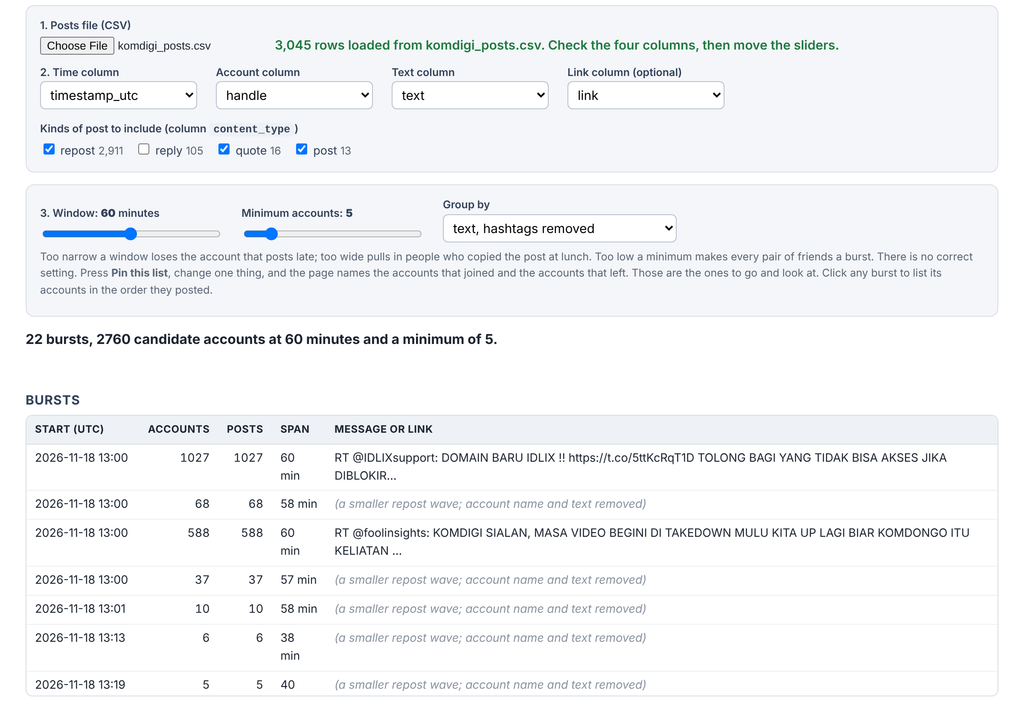
Three real hours with reposts switched on. The two big waves are the ones I talk about below. I took the names and words of the smaller accounts out of the picture, because they’re regular people and they aren’t the story.
Here’s what that is. One account posted a streaming site’s new web address and asked people to pass it along, and over the three hours 1,266 accounts reposted it. A second post, somebody cussing out Komdigi over videos getting taken down, picked up 960 reposts. A repost carries the original’s text word for word. So if your rule is “same words, same hour, lots of accounts,” these are two of the biggest bursts you will ever see.
And they’re not a network. In the last post we looked at who those 1,266 reposters were: the typical account was almost six years old with 88 followers, and only 10 of them were newer than a month. That’s ordinary people, not a rented crowd.
This is exactly why the explorer starts with reposts switched off, and why the checkbox is right there. With reposts off you’re asking who is writing the same thing. With reposts on you’re asking what got amplified, and by how many. Both are good questions. They are not the same question, and it’s an easy pair to mix up.
Try it
TopicStream is free and open source, and so is the explorer. It’s plain Python, with nothing extra to install.
- Get it: github.com/ArgeliusLabs/TopicStream
- Watch it move on the made-up sample: run
python -m topicstream explorer, then chooseexamples/explorer-demo.csv. - Use it on your own topic: collect with
python -m topicstream run --config config.json, write it out withpython -m topicstream export-csv posts.csv --config config.json, and loadposts.csvin the explorer.
The only thing in that list that costs money is collecting from X, and you’re paying X for the data, not anybody for the tool. Collecting from Bluesky or Mastodon is free, and so is loading a CSV you already have. The last post has the real numbers on what X charges.
Once you find a window and a minimum that fit your data, put those two numbers in the config and every report TopicStream writes from then on uses them.