
For years Instant Data Scraper was one of the easy recommendations in my OSINT classes. You’d land on a page full of search results or a member directory, click the icon, and it would figure out the table structure and hand you a CSV. No code, no fuss. Then in early 2026 it was sold. The original developer, Web Robots, handed it off to a company called Flavr Technology, LP. There was no big announcement. The Chrome Web Store page still shows a 4.9 star rating, a million users and the Featured badge. If you looked at that listing today you would have no reason to think anything changed.
That bothered me a lot. Not because I know the new owner is doing something malicious, but because I had no good way to know either way, and neither did my students. So I built something to answer that question, and a bunch of other ones that we should all be asking.
It’s called Dossier, it’s free and open source, and version 1.6.3 is on GitHub now: https://github.com/ArgeliusLabs/Dossier
What Dossier does
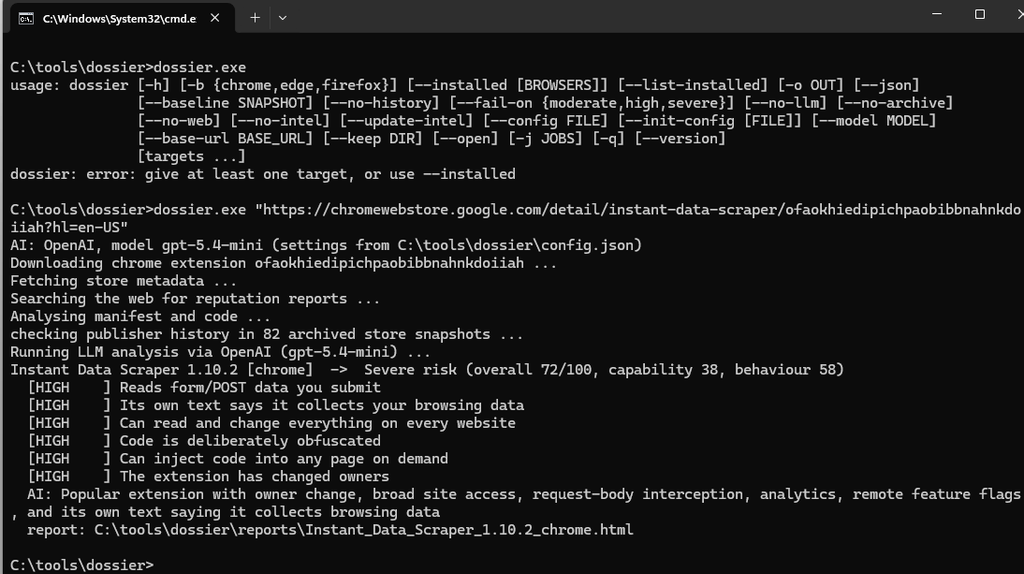
You point Dossier at a browser extension and it gives you back a single HTML report that explains, in normal language, what that extension can see, what its code actually does, where it sends data, and who is behind it. You can give it a Chrome Web Store link, a bare extension ID, an Edge or Firefox add-on, a .crx or .xpi file you pulled from somewhere, or an unpacked folder. You can also just tell it to go look at everything already installed on your machine.
The audience I had in mind is people like my students. OSINT investigators, red and blue teamers, anyone who keeps separate browser profiles for work they don’t want tied back to them. For us an extension isn’t just a convenience. It’s a piece of third party code sitting inside the exact browser we use to stay anonymous, with access to everything we look at.
Why another scanner?
I tried the existing extension scanners first. The problem wasn’t that they missed things. The problem was that they found everything. Version numbers flagged as IP addresses. File hashes flagged as Bitcoin wallets. Hundreds of eval() warnings that turned out to be inside jQuery. Run one of them against an ad blocker and you get thousands of “endpoints” that are really just entries in a filter list.
When the real finding is buried under 400 false ones, nobody reads the report. So most of the work in Dossier went into the boring part, which is deciding what not to report. It recognizes common libraries and counts their matches instead of listing them. It strips comments before matching anything. It only calls code obfuscated when it sees actual obfuscator fingerprints, not just minified JavaScript. On uBlock Origin Lite, that filtering takes roughly 2,900 URLs down to the one server it actually talks to.
And it doesn’t hide what it ignored. Every report has a “Noise we filtered out” section that tells you how many things were dropped and why, so you can check its work.
The ownership check
This is the feature I built Dossier around.
Extension stores don’t publish ownership history. If an extension gets sold, the listing just quietly updates the publisher name and carries on with all the ratings and badges the previous owner earned. That pattern, where a popular extension is bought and then updated to collect or sell browsing data, has happened over and over.
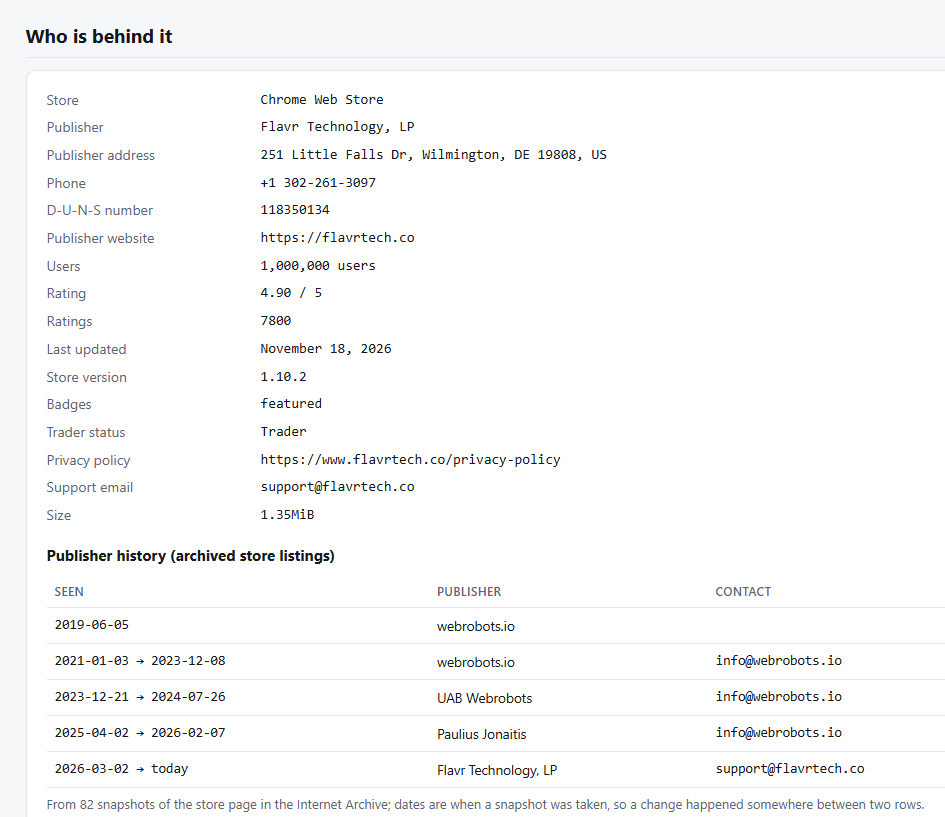
Dossier rebuilds that history from the Internet Archive. It pulls the archived snapshots of the store page going back years, samples them, and narrows down every point where the publisher name or contact domain changed. If the organization behind the extension is different now, you get a finding that says “The extension has changed owners” and a timeline under Who is behind it. Trust signals like the user count and Featured badge get labeled as earned before the change of owner, which is exactly the context the store leaves out.
For Instant Data Scraper, the timeline shows webrobots.io as the publisher in snapshot after snapshot, and then Flavr Technology, LP today.
So what did it find on Instant Data Scraper?
The verdict was Severe. To be clear about what that means: Dossier isn’t saying “this is malware.” It’s saying don’t put this in a profile you care about without looking at the flagged code yourself. The reasons it gave:
- It reads form and POST data you submit on matched requests.
- Its own text says it uses the URLs you visit, and the package ships with consent and privacy notice screens, which is a pattern you tend to see with browsing data collection.
- Part of the code is deliberately obfuscated.
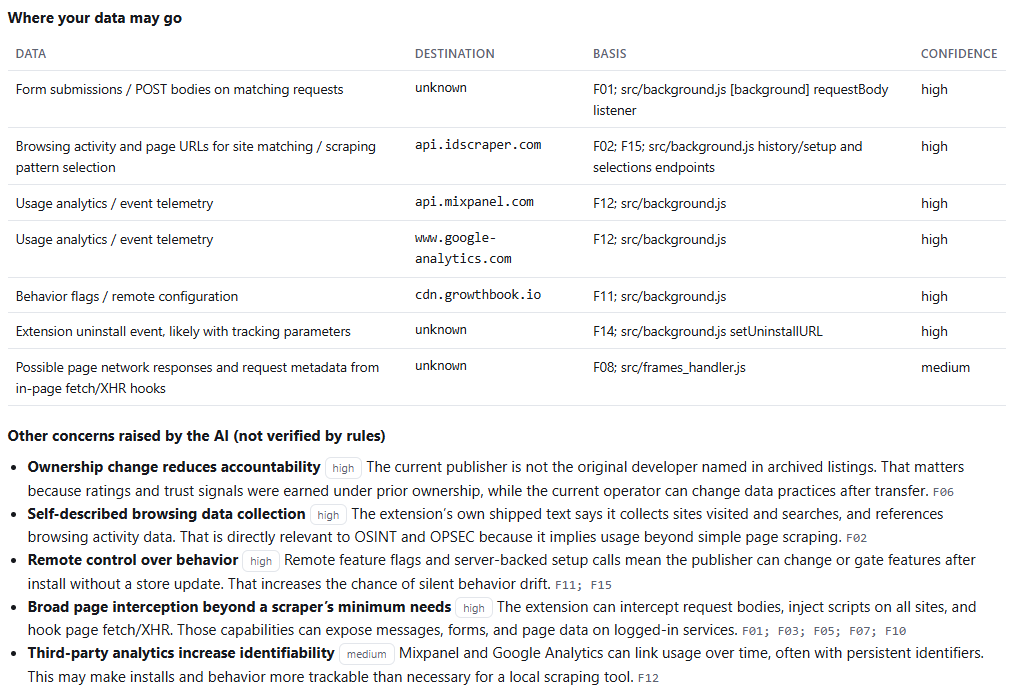
- It sends analytics to Mixpanel and Google Analytics.
- And of course, it changed owners.
The part I want people to notice is this: as of the day I’m writing this, Instant Data Scraper is not on any of the public known-malicious extension lists. Dossier checks those too (more on that below), and they came back clean. If your only defense is “is this on a blocklist,” you’d keep using it and never think twice. The ownership change and what the code does are what tell the story here.
It doesn’t call everything malicious
A tool that flags every extension as dangerous is just as useless as one that flags nothing. If everything is red, students learn to ignore red. I spent as much time on this side of the problem as on catching the bad ones.
The biggest piece is how the report is laid out. Dossier splits its findings into two buckets. What it does covers behavior: what the code actually does, where data goes, who the publisher is, and what the web says about them. What it can do covers permissions and access. Those are very different questions, and most scanners mash them together into one scary list.
When an extension has no red flags in the first bucket, its permissions show up as plain grey access facts instead of red alarms. “Can read every site you visit” is still on the page, and it still counts toward the score, because that access is real. It just isn’t dressed up as an accusation. When there are red flags, like with Instant Data Scraper, the same permissions get the attention they deserve, because now there’s a reason to worry about how they’re used.
Here’s what that looks like on two extensions I’d happily recommend.
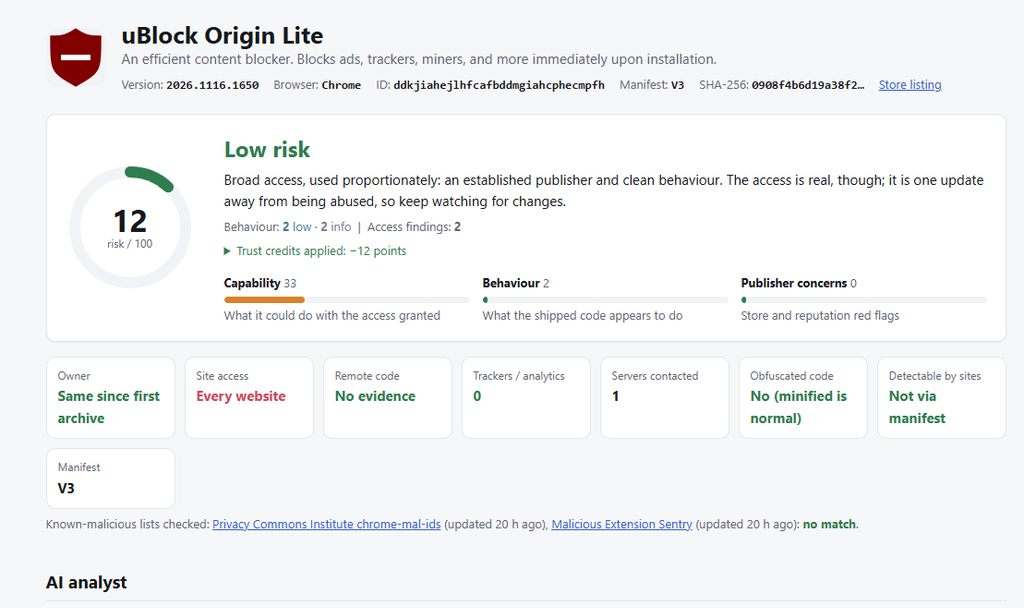
uBlock Origin Lite came back Low, with the summary “broad access, used proportionately.” It can see every site you visit, which on paper is scary. But it’s been with the same publisher for years in the archived listings, it has a huge user base, the code is open source, there’s no tracking or analytics in it, and it only fetches from one server. Dossier gives established, clean extensions trust credits for those things and shows you exactly which credits it applied. It still reminds you that the access is real and the extension is one bad update away from being abused, which is fair.
Bitwarden came back as High exposure, powerful by design. A password manager has to read every page, touch the clipboard and talk to its desktop app. That’s the job. Dossier doesn’t pretend that access is harmless, but it also doesn’t accuse Bitwarden of anything, because there’s no tracking, no change of owner and no hits on the malicious lists. The label is about how much you’d lose if it were ever compromised, so you can decide which profiles it belongs in. For most of us that means your personal browser, and probably not your sock puppet one.
I care about this distinction a lot. Students should come away understanding that “has scary permissions” and “is doing something shady” are different questions. Now the report itself teaches that, just by how it’s laid out.
It also recognizes the components your browser ships with on its own, so built-in pieces of Chrome or Edge don’t show up in an installed audit looking like mystery extensions you never installed.
Audit everything you already have installed
Checking one extension at a time is fine when you’re deciding whether to install something new. But the bigger risk is the stuff you installed two years ago and forgot about.
dossier --list-installed
dossier --installed --open
Dossier looks through the standard profile locations for Chrome, Edge, Brave, Chromium, Vivaldi, Opera and Firefox, analyzes each extension, and gives you a dashboard with one row per extension. It records which browser and which profile each one lives in, which is handy when you’re running several personas and want to see which one has what. It also flags extensions that have been pulled from the store but are still sitting in your browser. Takedowns are often for malware, so that one gets taken seriously.
It never modifies your browser profiles. It only reads them.
One thing I ran into while testing: some antivirus products and endpoint tools lock down browser profile folders, so Dossier can see that an extension is there but can’t read its files. When that happens it pulls the store’s current copy of the same extension instead and labels the report clearly as Analysed copy: store version, with your installed version right next to it so you can compare. You still get a result instead of a gap.
It remembers what it saw last time
Every audit saves a small snapshot. The next time you run Dossier against the same extension, the report gets a “What changed” section: new permissions, new trackers, a new publisher, or a silent repack where the code changed and the version number didn’t. That’s the bought and weaponized pattern showing up as it happens, instead of in a news article six months later.
I’d suggest running --installed on your investigation machines on a schedule. If you want to wire it into something, --fail-on severe will return a nonzero exit code when anything crosses the line.
Known-malicious lists
Every extension gets checked against public lists of known-bad extension IDs: the Privacy Commons Institute’s chrome-mal-ids list, Malicious Extension Sentry (which tracks store takedowns and updates daily), and Mozilla’s add-on blocklist. Between them that’s around 17,000 Chrome extension IDs plus Mozilla’s list. A hit puts a red banner across the top of the report with the reason and the sources.
I tightened the Mozilla check after it embarrassed me. Mozilla’s blocklist covers specific versions of an add-on, and it also has housekeeping entries that aren’t really about anything malicious. An early build of Dossier saw FoxyProxy on that list and raised a red banner, which was flat wrong. Now Dossier only raises the alarm when the version you actually have installed is the one that’s blocked, and it skips the housekeeping entries. Again, a false alarm on a tool people rely on is a real cost, not a rounding error.
From an OPSEC standpoint I was careful about how this works. The Chrome lists are downloaded whole and cached locally, refreshed once a day, so checking an extension doesn’t tell anyone which extension you’re looking at. It also means the check still works offline.
Optional AI analysis
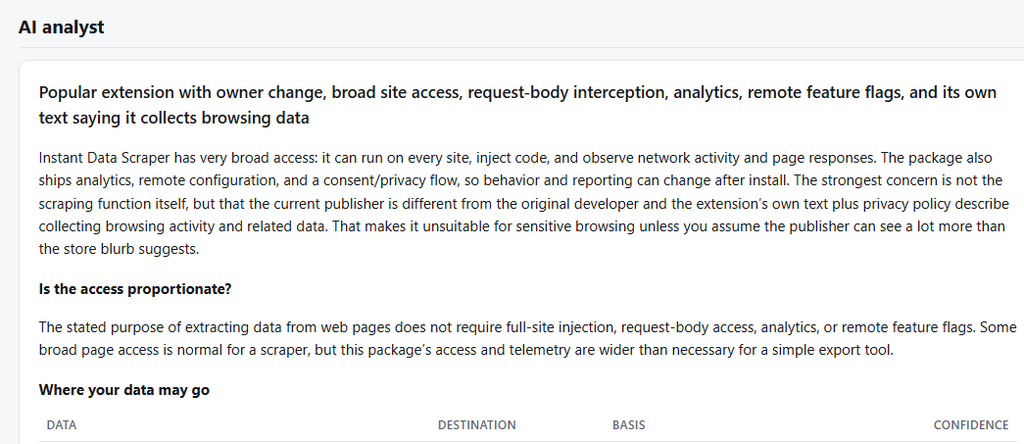
The core static analysis runs without any AI at all. If you want it, Dossier can hand its findings to a language model for a plain language write-up, a take on whether the access is proportionate to what the extension claims to do, and a false positive review of each finding.
It works with OpenAI or with a local model through anything that speaks the OpenAI API, like Ollama or LM Studio. Switching is one line in config.json. For people who can’t send anything about their tooling to a third party, the local option matters.
I put a couple of guardrails on it. The model can only lower the weight of a finding, never raise a score, and it can’t dismiss the serious manifest level capabilities. Everything that comes from inside the extension is passed to it as untrusted data, because some extensions now ship text that’s written to sway automated reviewers. (Dossier flags that too.)
With OpenAI there’s also an optional web reputation search, about two cents per extension, that looks for news, researcher posts and forum threads about ownership changes, data harvesting or store removals and lists what it found with links.
Getting started
There are prebuilt binaries for Windows, Linux and macOS on the releases page, so you don’t need Python installed:
https://github.com/ArgeliusLabs/Dossier/releases/latest
Download the archive for your platform, extract it, and you’ll find the dossier program, a config.json ready for your OpenAI API key if you want the AI features, and a short quickstart file. The binaries aren’t code signed yet, so Windows SmartScreen may complain on first run, and on macOS you may need to clear the quarantine flag. Checksums are attached to every release.
Then try it:
dossier ofaokhiedipichpaobibbnahnkdoiiah --openIf you’d rather run from source, it’s a standard pip install and the README walks through it. And if you’re on Windows and pasting store links, put them in double quotes. Store URLs often have an & in them and the shell will cut the link off right there.
Safety of the tool itself
If you’re going to run a tool against sketchy extensions, you should know what the tool does. Dossier never executes extension code. Packages are unpacked into a temp folder with protections against the usual archive tricks and cleaned up afterward. The HTML reports load nothing from the network and escape everything that came from the extension or the store. With AI turned off, the only network traffic is to the extension stores, the Internet Archive for publisher history, and the once a day blocklist refresh, and each of those can be switched off.
Go check your browser
Here’s my ask. Run dossier --installed on the machine you do your investigations from. I’d bet most of you find at least one extension you forgot was there, and maybe one that isn’t owned by who you think it is.
If you find a false positive, a detection it should have caught, or an extension with a story like Instant Data Scraper’s, open an issue on GitHub. I’d really like to hear about it.